
The problem
Modern smartphones are built to capture attention, not to be easy. For many older adults, tiny text, nested menus and accidental swipes make even a phone call stressful, and family members end up acting as permanent tech support. Buying a dedicated “senior phone” means new hardware and a downgrade in features, and most launchers on the market come with ads or subscriptions.
What it does
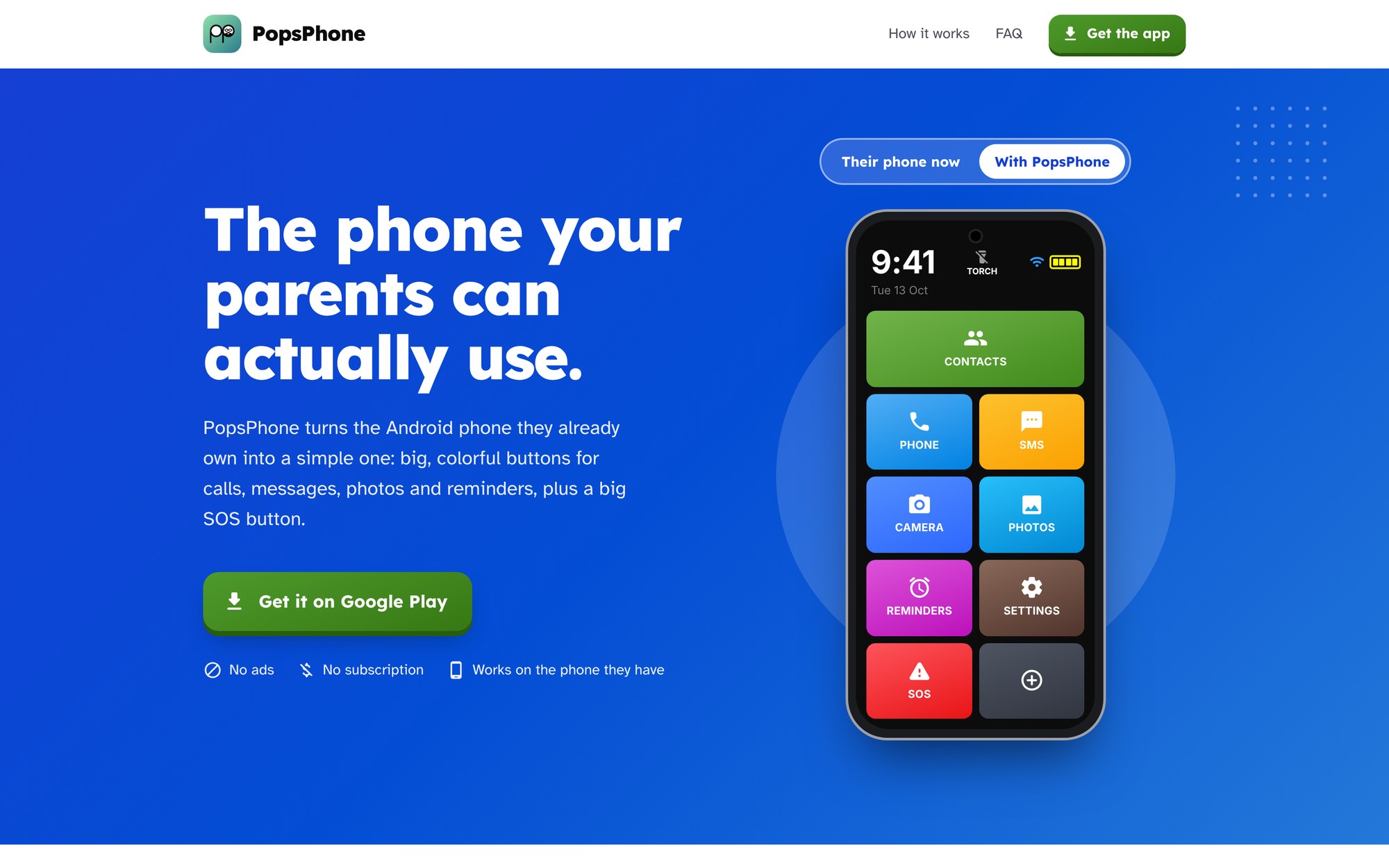
PopsPhone is a home screen launcher and phone dialer that runs on the phone people already own. Once it’s set as the default home app, the phone shows only what matters: the people they call, their photos, their reminders and a way to get help. Calling family, taking a photo or getting help never takes more than one tap, and switching back to the normal Android home screen takes one setting, at any time.
- One-screen home: a black, high-contrast layout with a large clock, date, battery level and torch, plus big color-coded buttons for Contacts, Phone, SMS, Camera, Photos, Reminders, Settings and SOS. Each function has its own color, so it can be recognized by sight.
- SOS button: one tap calls the designated emergency contact.
- Full-screen reminders: medication and appointment reminders take over the whole screen, so they aren’t lost among other notifications.
- Built-in photo gallery with large thumbnails and no editing menus to get lost in.
- Large dialer and contacts, with big, readable names and numbers.
- Customizable: a ”+” button lets family members add the few extra apps their parent actually uses.
- Privacy-friendly SMS handling: following Google Play policy, PopsPhone doesn’t read or store messages. The SMS button opens the phone’s existing messaging app.
Design
Every element is sized for low vision and unsteady hands: large touch targets, strong contrast, uppercase labels and one consistent color per function. The same visual language, a deep blue gradient with bright tiles, carries across the app, the Play Store graphics, the website and the promo video.
How it works
- Built in Flutter, running as both the default home app and the default phone app on Android.
- Full-screen intents and exact alarms for reminders, following Android 14+ rules and Google Play declarations.
- Runtime permission flows designed for older users, with plain-language explanations and a direct path to settings when a permission was denied.
- Firebase for app infrastructure and stability monitoring.
Pricing
A single one-time purchase on Google Play. No ads, no subscriptions and no recurring fees: a deliberate choice for an audience that is often targeted by confusing billing.
Launch
- App Store Optimization: listing copy and store graphics written for the searches families make, such as “simple phone for seniors” and “big button launcher”.
- Landing page at popsphone.website, with an interactive before/after demo that turns a cluttered Android home screen into PopsPhone.
- A 19-second vertical promo video for YouTube Shorts, Reels and TikTok, told from the point of view of an adult child.
- Organic, zero-budget outreach on Reddit and caregiver communities, with free promo codes for early testers in exchange for honest feedback.
Where it stands
PopsPhone has been live on Google Play since September 2026. Product design, development and launch by Vecthor Studio. Next on the roadmap:
- More robust background reminders across manufacturers’ battery-saving modes.
- A call filter against scam calls: only my contacts can call.
- Expanded accessibility, including screen-reader labels and system font scaling on every screen.